VR labs for schools
Complete VR labs for Classes 6 to 12, with headsets, syllabus-mapped lessons, teacher training and support.

AiRedHQ builds custom AR and VR experiences, including VR training simulations, immersive lessons, AR apps and 3D product views, for companies, schools, colleges and EdTech teams. A typical prototype runs on the target headset or phone in 4 to 6 weeks, and a full experience in 8 to 16 weeks.
Interactive 3D model
Use space, presence and interaction only where they make training, visualization or understanding meaningfully better.
Complete VR labs for Classes 6 to 12, with headsets, syllabus-mapped lessons, teacher training and support.
Virtual labs and practice for engineering, nursing, ITI and vocational courses, where real equipment is scarce or costly.
Rehearse lockout, assembly or emergency steps where real mistakes are dangerous or expensive.
Walk a technician around a machine, highlighting parts, sequences and hidden internals.
Anatomy in 3D, procedure walkthroughs and patient education that people can turn and explore.
Show configurable products in 3D on a website, or at real scale in phone AR.
Walk buyers through a home or site before it is built, on a headset, phone or browser.
Let students, patients or visitors explore a place, a monument or an exhibit before or after they arrive.
Organisations where seeing or practising something in 3D changes the result: training, education and complex products.
Our immersive learning and simulation experience keeps spatial technology focused on comprehension, practice and performance.
Safe, repeatable practice for complex procedures and operational scenarios.
Interactive environments that turn abstract material into direct experience.
Guided spatial experiences for places, products and environments.
3D systems that reveal equipment, processes and information in context.
Concrete artifacts you keep, whoever builds the next version.
The learning goal, each step the user takes and what counts as success.
Modelling or CAD conversion in Blender, optimized to the target device's polygon and texture budget.
Browser, phone AR or Meta Quest, chosen for the audience, budget and logistics.
Movement style, frame-rate target, session length and play-area rules.
An early build to test controls and pacing before final art is made.
Completion, time per step, errors and retries, exportable for your reporting.
Define the task, the learners and how success is measured.
Output: Scenario brief
A step-by-step script of every interaction.
Output: Storyboard
A grey-box build running on the target device.
Output: Playable prototype
Final assets, audio and feedback.
Output: Production build
Sessions with real users for comfort and clarity.
Output: Comfort report
Device setup, distribution and analytics.
Output: Live deployment
The device decides cost, reach and how deep the experience can go.
Choose standalone VR on Meta Quest for VR training simulations where presence and hands-on practice matter, such as safety drills and procedures. Reach is limited to people with headsets.
Choose AR on iOS and Android phones to place products, labels or instructions in the real world. Almost everyone already carries the device.
Choose WebXR or interactive 3D with Three.js when reach matters most: a link opens it with no install. Visual detail and device features are more limited.
Start small and keep going only if it is working. Durations are typical; the first conversation sets the real scope.
Typically 2 weeks
Scenario, device choice and a rough 3D proof of concept.
Typically 4–6 weeks
One scenario playable on the target device and tested with users.
Typically 8–16 weeks
Production assets, several scenarios, analytics and deployment.
Monthly retainer
New scenarios, device updates and asset changes.
We do not publish fixed prices because scope varies widely. These factors move cost and timeline most; an audit or discovery engagement turns them into a written estimate.
We define what learners must be able to do first, then pick the device.
Uncomfortable movement ends sessions early, so comfort testing starts at the prototype.
Unoptimised CAD drops frame rates on standalone headsets and phones.
Without completion and error data, it is hard to show the experience worked.
We build and run software of our own. These are the parts that relate to this service.
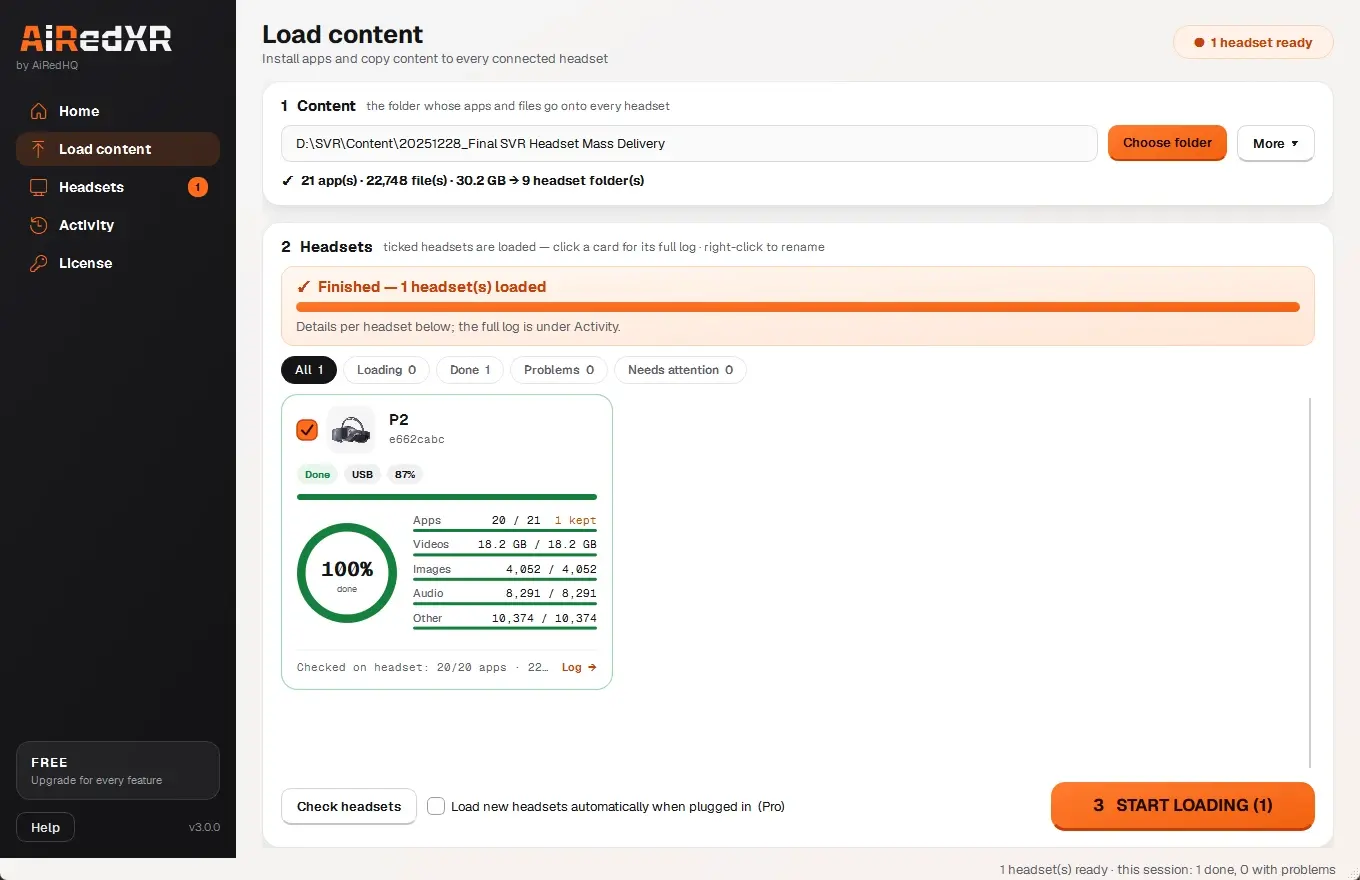
Load apps and training content onto a room full of headsets from one folder, checked on every headset.
The gearbox, heart and solar system at the top of this page are real-time 3D in your browser, with no plugin or download: rotate them, zoom in and click a number to learn each part. It is the same approach we use for browser-based training, lessons and product views.
Engine and device are chosen by where people will use it: browser, phone or headset. Unity for headset and phone apps, Three.js for the browser, Blender for assets.
 Unity
 Three.js
 Blender
 Meta Quest
 Apple
 Android
Updated
When spatial understanding, safe practice or presence improves the outcome enough to justify the medium.
Some experiences can use WebXR or interactive 3D; others require dedicated mobile or headset delivery.
Meta Quest for standalone VR, iOS and Android phones and tablets for AR, and modern browsers for interactive 3D.
Usually. CAD is converted and simplified in Blender so it runs at the device's frame rate; heavy assemblies are reduced and textures baked.
Comfort constraints influence locomotion, camera behavior, interaction, frame rate and testing from the beginning.
Yes. We set up complete VR labs for schools (Classes 6 to 12), colleges and training centres, with headsets, lessons mapped to the syllabus, teacher training and AiRedXR to manage the headsets. See our VR lab for schools and colleges.
Yes. We build white-label lessons, simulations and AR apps for EdTech companies and publishers, delivered to their own repositories and accounts.
A feasibility study typically takes 2 weeks, a prototype 4 to 6 weeks, and a full experience 8 to 16 weeks, depending on the number of scenarios and devices.
Yes. Headset and phone apps can run fully offline, which suits schools, factories and field sites with poor connectivity.
We start from the task a trainee must perform, storyboard the scenario with your subject experts, prototype the key interaction, then build, comfort-test and deploy with learning analytics.
Yes. A feasibility study or a single-scenario prototype lets you test with real learners before funding a full experience.